Changer de pays
Votre commande peut prendre jusqu'à 24-48 heures pour traitement. Une fois complété, le délai de livraison varie de 1-5 jours ouvrables selon l'addresse de livraison.
LIVRAISON GRATUITEpour toutes les commandes au-dessus de 49 $ au Canada! Commandes inférieures à 49 $, le frais d'expédition est seulement 7,95 $! *Livraison gratuite n'est pas disponible quand l’adresse d’expédition est un lieu éloigné.Plus >>
Se connecter
Votre commande peut prendre jusqu'à 24-48 heures pour traitement. Une fois complété, le délai de livraison varie de 1-5 jours ouvrables selon l'addresse de livraison.
LIVRAISON GRATUITEpour toutes les commandes au-dessus de 49 $ au Canada! Commandes inférieures à 49 $, le frais d'expédition est seulement 7,95 $! *Livraison gratuite n'est pas disponible quand l’adresse d’expédition est un lieu éloigné.Plus >>
Se connecter
Choosing the right printer for your home or business can be a bit overwhelming. With so many models on the market, at so many different price points, it’s hard to know where to begin. Whether you’re trying to print pictures from your family vacations, or you regularly print brochures and flyers for your small business, the printer choosing process can be frustrating and sometimes confusing, hence, we created this "Canadian printer buying guide" to help you to choose your right printer.123inkcartridges.ca created the following 6-step buyer’s guide to help you choose the best printer for your needs.
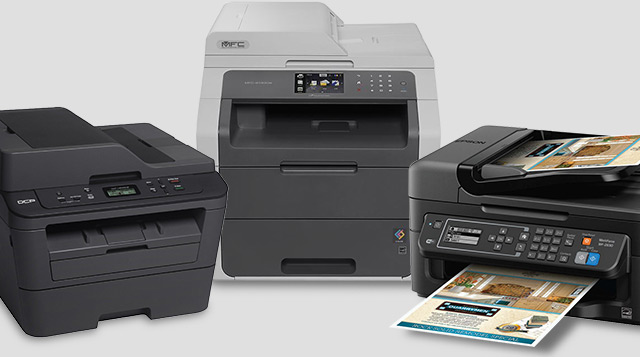
Now that you know what your printer needs are, it’s time to decide whether an inkjet printer or laser printer best suits those needs. Here’s a little background information about inkjet and laser printers to help you gain a more in-depth understanding of the differences between the two.
Inkjet printers use liquid ink, which is sprayed through microscopic nozzles onto the paper.
Laser printers use a toner cartridge (filled with fine powder) and a heated fuser, which binds the heated toner to the paper.
Both Inkjet and Laser printers have different functions to choose from. Now it is time to decide whether you need a single function or multifunction printer.
Ask yourself what types of documents you will be printing to determine the type of printer that will suit you best. If you will only be printing black and white documents such as invoices and text documents, then all you need is a monochrome printer. Opt for a color printer if you also need to print color documents, or photos on a regular basis.
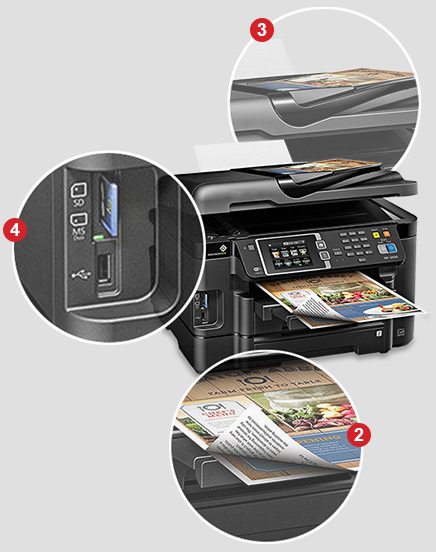
Connectivity is important to consider when it comes to choosing the right printer. There are four types of connectivity options for printers: USB; network (LAN); wireless and mobile. The connectivity type you choose depends on how you plan to use and the environment of your new printer. Check below to learn more about the different connectivity types:
A USB printer connects to your computer via a USB cable. Most printers can be connected via a USB cable.
A USB printer connects to your computer via a USB cable.
Network printers are connected directly to a network via a router and an Ethernet cable. To access a network printer you must connect your computer to the same network.
Network printers are ideal for office environments because they can be shared by office staff members. If you want to purchase a network computer, look for a USB printer with an Ethernet feature.
Network printers are connected directly to a network via a router and an Ethernet cable.
For wireless printers, all print materials are sent to the printer via a wireless connection.
Wireless printers are a great option for offices where people bring their own laptops to work, or homes with multiple family members who need to share access to a single printer. If wireless sounds right for you, look for wireless connectivity (usually up to 802.11n specification).
For wireless printers, all print materials are sent to the printer via a wireless connection.
Mobile printers are perhaps the most flexible options on the market in terms of connectivity. They allow users to print wirelessly from their mobile devices, and in some cases from cloud services. Printers with the Air Print feature allow users to print from an iOS device. Users can also print on mobile printers using Google Cloud Print to print from Android and iOS devices, or use printer-specific apps to print from iOS or Android devices.
They allow users to print wirelessly from their mobile devices, and in some cases from cloud services.
There are a few other factors to consider when choosing the right printer. Is the unit noisy? Is the printer efficient or does it draw a lot of power? What is its memory capacity? Does it feature a USB flash port? How big is it and is it easy to install? We recommend finding answers to these often-neglected questions before you buy.
Commonly, printers will handle paper up to the Letter Size 8.5” x 11”, so you will have to look for a specific model if you want to be able to accommodate documents on Legal Size paper 11” x 17” as well.
Automatic duplex (two-sided) printing to help save more paper
Automatic document feeder or ADF is a feature which takes several pages and feeds the paper one page at a time into a scanner or copier, allowing the user to scan, and there by copy, print, or fax, multiple-page documents without having to manually replace each page.
It’s always handy to choose a printer equipped with a front-facing USB flash drive port. This special port allows users to print from, and scan to, USB flash drives directly from the printer control panel without a PC.
Printers can be large and bulky, especially in a corporate setting. This makes them potentially difficult to move around without assistance. The size of the printer you want should be considered before purchase, not to mention the space available for it to reside in your home or office. After some consideration, you may opt for a more compact alternative that better suits your office space while still providing similar functionality. Beyond size, it’s important to assess how easy it is to install the printer’s toner cartridges and load its paper. Finding an easy to maintain printer is key for busy offices and individuals.
Cost is key to any smart purchase. Setting an initial budget for your new printer can quickly help you narrow down your options. Printers are sold for a broad range of prices -- from less than $100 to several thousands of dollars per model. It is important to consider the cost of the printer you plan to buy, and the cost and number of cartridges needed for the printer to operate.
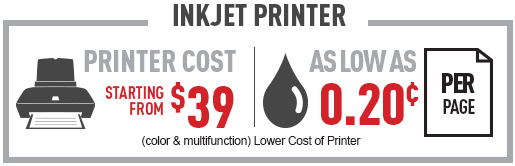
Printer cost is a key factor to consider. Inkjet printers start from as low as $39 while laser printers begin at around $70. With a budget of $39, you could get a multifunction color printer, while with $70 budget, you could get a single function monochrome laser printer. Remember, you don’t need to spend a lot to get the right printer. Just remember to ask the right questions and look for the features you need to find the best printer option for your home or business.
A printer's cost per page (CPP) is incredibly important when it comes to choosing printers. A printer’s CPP tells you how much it will cost to print a page based on the consumables (toner or ink) of every photograph or page that you print - this can be as low as $0.10 per page! If you only print once in a while, you may not care too much about CPP, if you often print large volumes, CPP is definitely something you need to consider when buying a printer.
Did you know that you can save big on printer cartridges when you shop with 123ink.ca?
We offer incredible deals through our website 123ink.ca on OEM and compatible ink cartridges and toner cartridges.
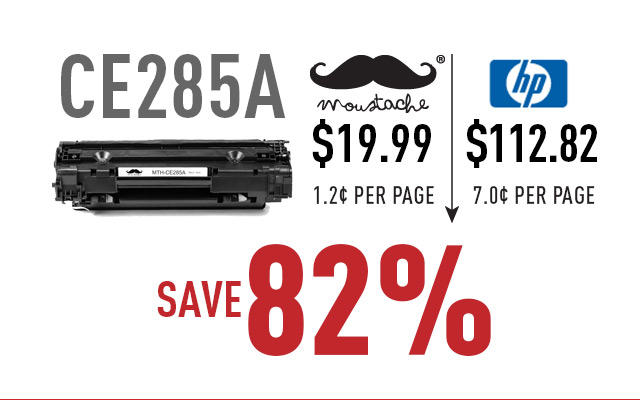
Our own brand cartridges, Moustache, features a reliable quality, an affordable price and a worry-free 2-year guarantee.
Moustache cartridges produce high quality prints at very low cost, and they work with brand name printers perfectly.
Shop with us and save up to 85% on compatible cartridges!


If you’ve never used a compatible cartridge before, don’t worry, our 2-year guarantee allows you to return defective items anytime within the first 2 years of possession.
So you can shop confidently. We also provide helpful customer service (live chat, phone and email support) and fast shipping in Canada (with free shipping on all orders over $49).
So you always feel confident about your purchases.
Professionally manufactured
Rigorous test requirements
Save up to 85% compared to OEM
Earn 20 bonus S-Points for every
dollar spent.
2 years guarantee
24 hour customer service
(Mon-Fri)
Eastern and western
warehouses to ensure fast
shipping across Canada
Pays & langue
Vous êtes sur le point de passer à notre expérience de magasinage United States. Souhaitez-vous continuer?
CONNECTEZ AVEC NOUS:
Inscrivez-vous à notre newsletter par email.
Ce que disent nos clients Shopper+
Site is easy to read and navigate. Not true for many other sites. Lots of other stuff to choose from as well. When I get time, I'll have a good look. Thanks!
Sean Ljuin, 2023
Recherche simple et facile, paiement super rapide, livraisons toujours reçues dans les délais indiqués
Maurice Ljuin, 2023