Change country
Our processing time for orders may take up to 24-48 hours. Once processed, the estimated delivery time can take anywhere from 1-5 business days depending on the shipping destination.
FREE SHIPPING* on all orders over $49 in Canada !All orders under $49, the cost of shipping is only $7.95! *Free shipping is not available when the shipping address is a remote location.More >>
Sign In
Our processing time for orders may take up to 24-48 hours. Once processed, the estimated delivery time can take anywhere from 1-5 business days depending on the shipping destination.
FREE SHIPPING* on all orders over $49 in Canada !All orders under $49, the cost of shipping is only $7.95! *Free shipping is not available when the shipping address is a remote location.More >>
Sign In
Recycling programs are sustained through the collection of an Environmental Handling Fee (EHF) enforced by provinces in Canada. They are paid at the time you purchase a new computer, notebook, monitor, television and other applicable electronics (outlined by Province below) – so you won't need to worry about paying a Fee to recycle your end-of-life electronics. Read More…
Bonus points are offered as part of our Shopper+ S-points Club program and can be collected on the purchase of most items sold on our web sites, Earn 20 S-Points for every 1 dollar spent on our websites or make use of our promotions.
Note: the total s-points offered on individual items may be affected by other offers or discounts in your cart.
You must have an account to collect s-points. It's free to create an account -- if you don’t have an account, just click create an account.
Due to the delivery issue, limiting the quantity of the products to the single order and you may add the remaining items in a following order.
Products offered for purchase at a reduced price normally for a limited period. (Coupons do not apply to on sale products.)
Are products made by the Original Equipment Manufacturer under its own name and branding. OEM products take on the warranty of the manufacturer and not of the vendor. (Coupons do not apply to OEM products.)
Products already priced at our best everyday value. (Coupons do not apply to Best Value products.)
Holiday items may not be returned nor refunded after their respective holiday, this includes unopened items (holidays include Valentine’s Day, Saint-Patrick’s Day, Easter, Canada Day, Thanksgiving, Halloween, Christmas).
Seasonal products at Shopper+ are special return and exchange Conditions Further details are available contact our Customer Service.
Final sale items or discontinued items at extremely discounted prices. All items tagged CLEARANCE may not be returned or exchanged as all purchases are final on clearance items. (Coupons do not apply to clearance products.)
Local delivery product(s) are shipped by Shopper+ Express and are only available for certain addresses. Please check if Local Delivery is available at your address before placing your order. Thank you.
The product is eligible for free shipping within Canada shipped via standard delivery. Free shipping is not available when the shipping address is a remote location.
product highlights
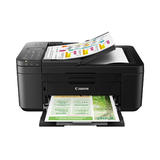
For all your work or home printing needs, the PIXMA TR4720 Wireless All-in-One Printer has you covered. Enjoy simple setup through the Canon PRINT Inkjet/SELPHY App and an easy to install 2-Cartridge hybrid ink system and front loading 100-sheet paper tray. Big on performance, the PIXMA TR4720 is equipped with Auto 2-Sided Printing, an Auto Document Feeder for multi-page scanning, and built-in Fax functionality. With a variety of connectivity options, you'll be able to do it all from your PC or mobile devices - plus, the PIXMA TR4720 is compatible with Canon apps for printing, scanning, creative projects and more. Simple, productive office and home printing in a compact size - that’s the PIXMA TR4720.


Print, copy, scan, fax: the PIXMA TR4720 is a true 4-in-1 printer
Simple initial setup through the Canon PRINT Inkjet/SELPHY app
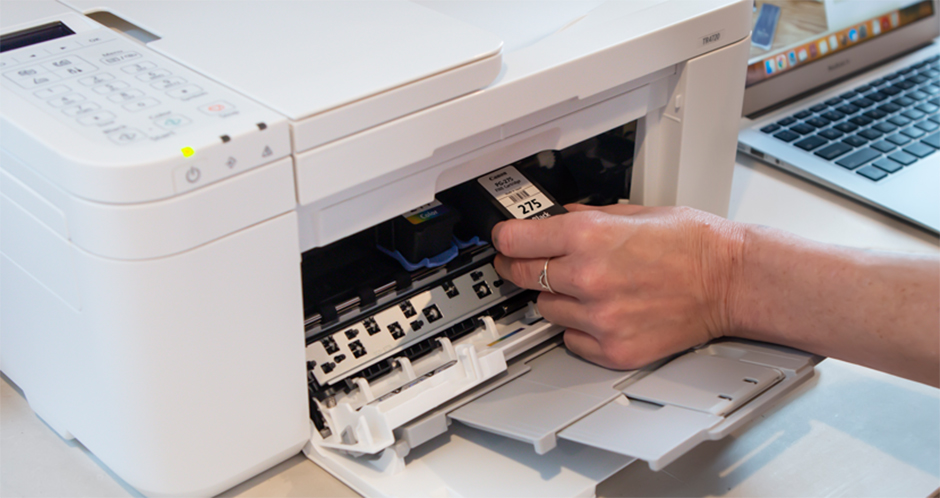
Easy cartridge installation & replacement
Easy to load front paper tray — 100 sheet plain paper capacity
Auto document feeder, efficiently scans multi-page documents up to legal size
Save up to 50% of your paper costs with auto 2-sided (duplex) printing for letter size documents
With a built-in fax, the TR4720 is ready to work when you are
A hybrid ink system produces both sharp black text and colourful prints
With built-in wireless connectivity, easily print from any room — from laptops, tablets, and smartphones
Print and scan right from your smartphone or tablet with the Canon PRINT INKJET/SELPHY APP
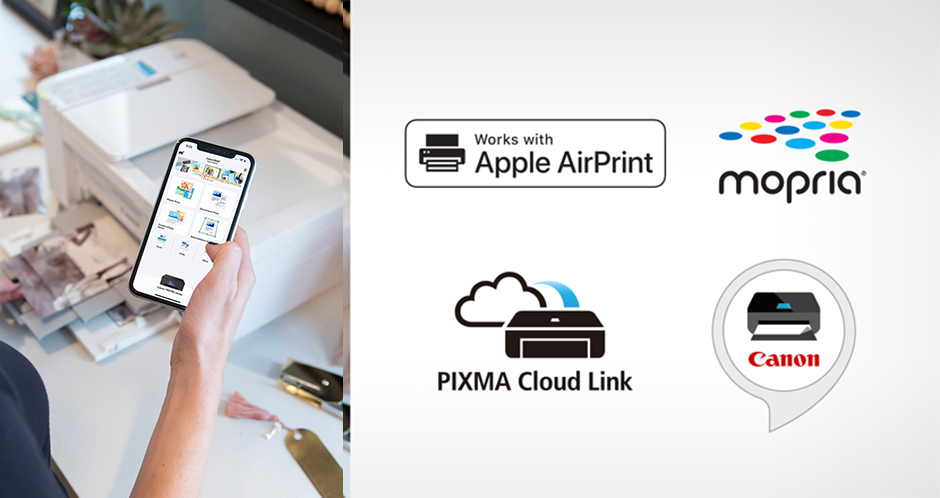
Print how you want with a variety of mobile connectivity solutions for iOS® and AndroidTM: AirPrint®, Mopria® Print Service, PIXMA Cloud Link.
Enhanced creativity with mobile and PC applications: Easy-PhotoPrint Editor5, Creative Park App6, and Poster Artist Lite (Windows only)
Smart assistant support: print directly from Amazon AlexaTM and Google HomeTM smart devices
Enjoy print speeds of approximately 8.8 images per minute (black) / 4.4 images per minute (colour)
Print borderless photos from 4"x6" to 8.5"x11"
With auto power on/off, the printer will automatically turn on when you need it and off when you don’t
Document removal reminder will let you know when you’ve left an original document on the scanner platen
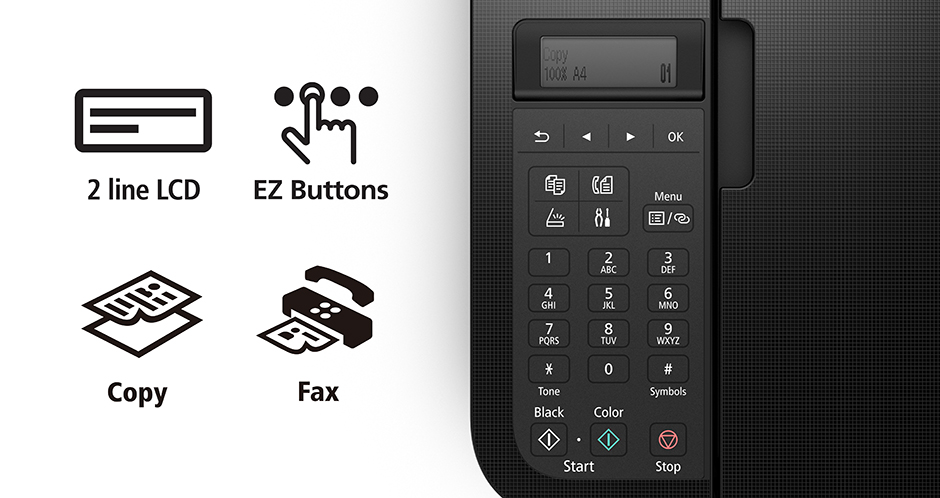
With a 2-line LCD display and simple buttons, easily adjust printer settings, make copies, and send faxes with the numeric keypad

Easy Setup
Enjoy simple setup through the Canon PRINT Inkjet/SELPHY App. Download the app, connect to the printer, follow a few easy steps on the screen, and you’re ready to print wirelessly!


Easy To Install
Designed for easy ink cartridge installation and replacement, the PIXMA TR4720 only needs 2 cartridges to print documents and photos.

Front Paper Tray
A fast and easy to load front paper tray with 100-sheet plain paper capacity reduces the need to refill paper as frequently.


Designed For Your Space
The PIXMA TR4720 has a compact design, to fit your space at the office or at home.


For Office And Home, Efficient Document Printing & Scanning
Scan up to Legal size multi-page documents efficiently with the Auto Document Feeder. And save up to 50% of your paper costs with Auto 2-Sided (Duplex) Printing for Letter size documents.


Quality Documents & Photos
The PIXMA TR4720 utilizes a hybrid ink system with pigment-based black and dye-based colour for sharp black text and vivid colour prints. Product quality documents, photos, and also borderless prints up to 8.5” x 11”.


Simple Printer Interface
With the 2-Line LCD display and simple buttons, easily adjust printer settings, make copies, and send faxes with the number pad. Receive a Document Removal Reminder on the display if you forget your original document on the scanner.

Canon Print App
Print and scan photos or documents right from your mobile devices or cloud services with the convenient Canon PRINT Inkjet/SELPHY App.


Connect Your Way
Print directly from your favorite iOS and Android™ devices without drivers or apps using AirPrint® and Mopria® Print Service. Plus, print from connected cloud-based services through PIXMA Cloud Link. The TR4720 also has voice-activated Smart Assistant Support for compatible Amazon Alexa and Google Home devices.

Unleash Your Creativity
Get creative with Canon with a variety of apps and programs. Use Easy PhotoPrint Editor to print collages, calendars, business cards, ID photos and more. With Creative Park App you can explore and print projects like crafts, decorations, and games. And create and edit posters with Poster Artist Lite for Windows PCs.


| Print Technology | Inkjet |
| Colour/Black & White | Colour |
| Max. Black Print Speed (ppm) | Approx. 8.8 ipm |
| Max. Color Print Speed (ppm) | Approx. 4.4 ipm |
| First Time to Print | N/A |
| Print Resolution (maximum dpi) | Up to 4800 x 1200 dpi |
| Automatic Duplex Printing (Two-Sided Print) | Yes |
| Standard Paper Capacity (sheets) | Input Capacity: 100 Sheets of Plain Paper OR 20 Sheets of 4 x 6 / 10 Sheets of 5 x 7 Photo Paper |
| Optional Paper Capacity (sheets) | N/A |
| Hi-Speed USB 2.0 | Yes |
| Network Ready | No |
| Wireless Ready | Yes |
| Wi-Fi Enabled | Yes |
| AirPrint | Yes |
| Google Cloud Print | Yes |
| Printer Driver Compatibility | Windows: Windows® 10, Windows 8.1, Windows 7 SP1; Mac: macOS 10.12.6 – 10.15 (Catalina); Chromebook Compatible; Mobile Operating Systems: iOS®, iPadOS, Android™ |
| Max. Monthly Duty Cycle | N/A |
| Recommended Monthly Print Volume | N/A |
| Standard Memory (MB) | Approx. 50 pages |
| Optional Memory (MB) | N/A |
| Media Card Support | No |
| USB Direct Interface / PictBridge | No |
| Media Type Handling | Plain: Plain Paper; Glossy: Photo Paper Pro Platinum, Photo Paper Plus Glossy II, Photo Paper Glossy; Semi-Gloss: Photo Paper Plus Semi-Gloss, Photo Paper Pro Luster; Matte: Matte Photo Paper; Other (non-Canon): Recycled paper and Chlorine-free paper can be used |
| Paper Handling Size - Paper Tray | Input Capacity: 100 Sheets of Plain Paper OR 20 Sheets of 4 x 6 / 10 Sheets of 5 x 7 Photo Paper |
| Paper Handling Size - Manual Feed | 4 x 6, 5 x 7, 8 x 10, Letter (8.5 x 11), Legal (8.5 x 14), U.S. #10 Envelopes Custom Size: Width: 4 - 8.5 / Length: 6 - 26.6 Borderless Printing11: 4x6, 5x7, 8x10, Letter (8.5x11) |
| Output Paper Capacity (sheets) | N/A |
| Copy | |
| Copying Capability | Black & White & Colour Copying |
| Auto Document Feeder (ADF) | Yes |
| Max. Automatic Document Feeder Capacity | up to 99 copies |
| Copy Speed | N/A |
| Control Panel/Display | 2-Line LCD Display (Full Dot Matrix LCD) |
| Copy Resolution | N/A |
| Document Glass Size | 4 x 6, 5 x 7, Letter (8.5 x 11), Legal (8.5 x 14) |
| Scan | |
| Scanning Capability | Black & White & Colour Scanning |
| Auto Document Feeder (ADF) | Yes |
| Optical Scan Resolution (dpi) | 600 x 1200 dpi |
| Input Colour Scan Bit Depth | Grayscale: 16-bit/8-bit; Color: 16-bit/8-bit Per Color |
| Scanner Driver Compatibility | N/A |
| Mobile device scanning app | N/A |
| Document Viewer Software | N/A |
| OCR Software | N/A |
| Formats (Export) | N/A |
| "Scan To" Feature | Auto Document Feeder (ADF), Auto Scan Mode, Document Removal Reminder, Save to PC, Scan to Canon PRINT App, Multi-Page PDF, Wireless Scanning |
| Fax | |
| Fax Capability | Black & White & Colour Faxing |
| Fax Memory | Approx. 50 pages |
| Fax Speed | Max. 33.6 kbps (Automatic Fall Back) |
| Best Transmission Speed (sec) | Black: Approx. 3 sec; Color: Approx. 60 sec |
| Other | |
| Unit Dimensions (cm; W x D x H) | 43.7 x 29.7 x 19.0 cm |
| Carton Dimensions (cm; W x D x H) | 54.6 x 37.3 x 25.7 cm |
| Unit Weight (Kg) | 5.8 kg |
| Carton Weight (Kg) | 7.5 kg |
| Carton Contents | PIXMA TR4720 Wireless All-in-One Printer, Set of Starter (PG-275/CL-276) Ink Cartridges, RJ-11 Telephone/Modem Cable, Power Cord, Documentation |
| Compatible Supplies | PG-275 Black: 5.6 ml (Std.) | 11.9 ml (XL) CL-276 Color: 6.2 ml (Std.) | 12.6 ml (XL) |
| Warranty | 1-year limited warranty with manufacturer |
Country & Language
You are about to switch to our United States shopping experience. Do you want to continue?
CONNECT WITH US:
Sign up for the email newsletter today!
What Customers Think About Shopper+
Site is easy to read and navigate. Not true for many other sites. Lots of other stuff to choose from as well. When I get time, I'll have a good look. Thanks!
Sean LJune, 2023
Recherche simple et facile, paiement super rapide, livraisons toujours reçues dans les délais indiqués
Maurice LJune, 2023